![]() |
|
#1
|
|||||||
|
|||||||
|
[GUIDE] EVGA X58 Snow Leopard 10.6.2 (10C540) Installation
From 10.6.0 to 10.6.2
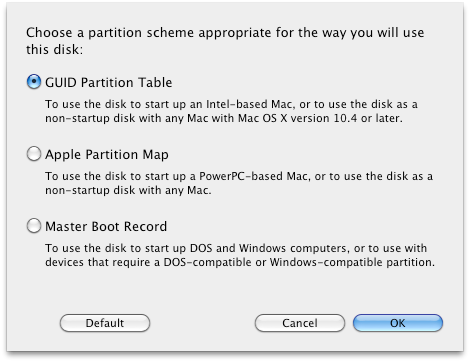
What you will need: 1. A working OS X Installation: Leopard. 10.5.7 Leopard GUIDE by ihavearedcouch or a distro (ex. Kalway) --- just use Kalway, search for it...it installs w/o hassle. you might get kernel panics, but just keep restartin computer until it boots up. 2. Retail/Beta copy of Snow Leopard 10A432. 3. A HD to install Snow Leopard on. 4. Airwalk's EXTRA FOLDER - Click to download 5. Airwalk's DSDT.aml - I prefer you create your own so it specifies your own hardware. 6. Chameleon RC3 - Click to download 7. SET YOUR BIOS SETTINGS: TO ENABLE, ENABLE, AHCI MODE + IDE, AHCI MODE - just the jmicron stuff 8. Check NOTES in the bottom of this post for extra stuff you might need... 9. Apple Combo Updater 10.6.2 This installation will take about 1-3 hours tops so be patient. it'll even take a whole day if you dont know what your doing... Before you install, change IDE to AHCI Mode. ![]() Installation: Step 1: Connect the Hardrive for the Snow kitty installation: USB Enclosure or to another Sata connection, i prefer SATA because it is much faster. Once it is connected, open up Disk Utility. Click the Hardrive and format it to GUID. ![]() Step 2: Mount/Click your Snow Leopard Install file. Once the Install window pops up, hold the these keys [ Shift + Command + G ] and enter Code:
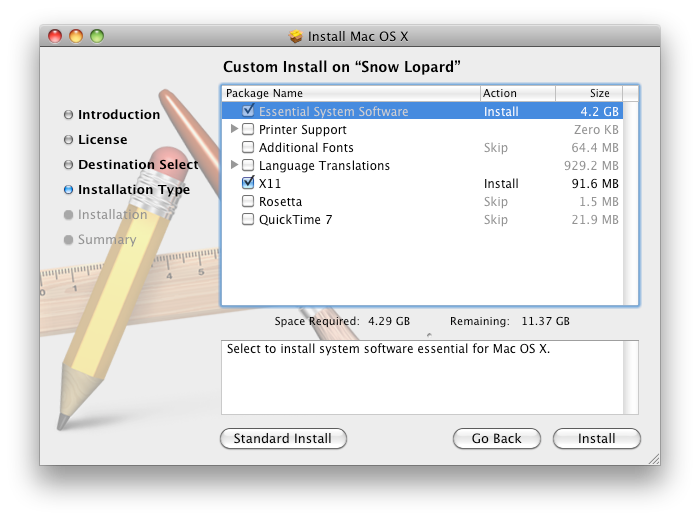
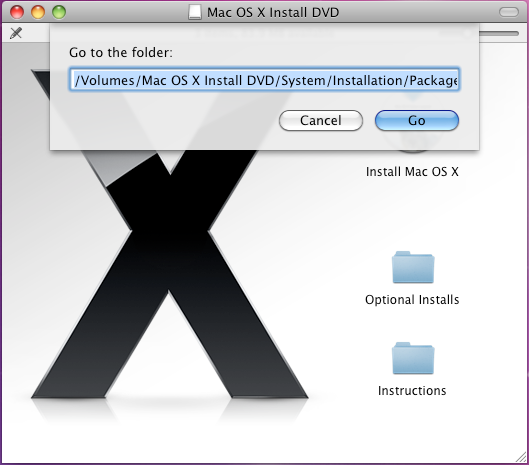
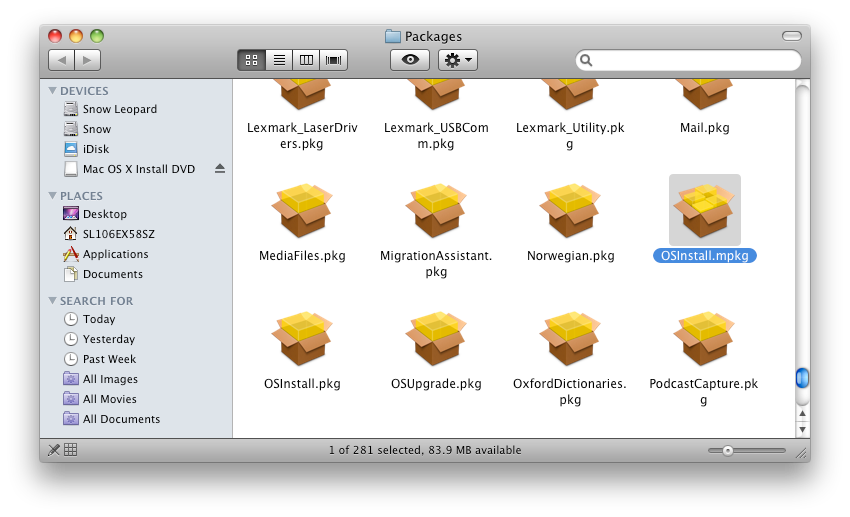
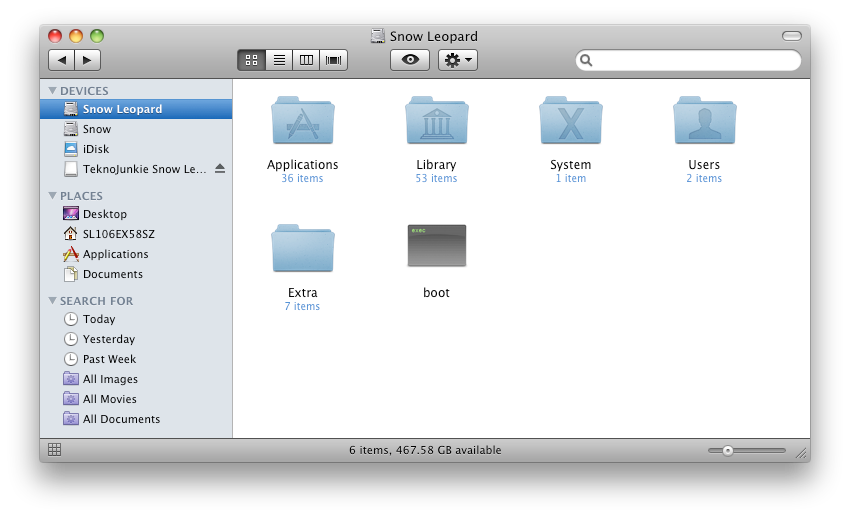
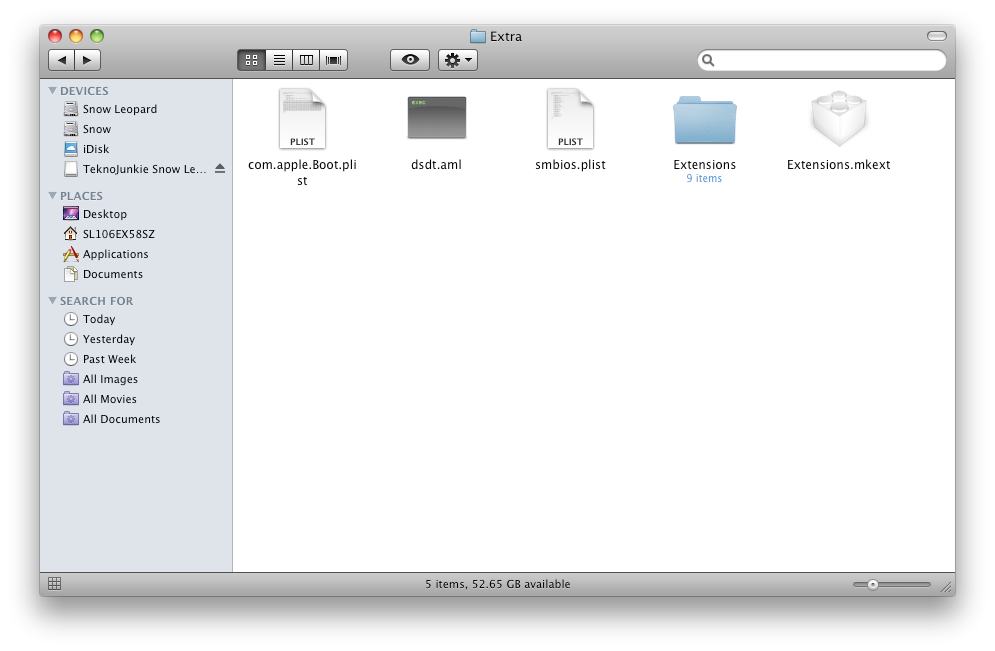
/Volumes/Mac OS X Install DVD/System/Installation/Packages . A window will pop up showing all the hidden packages. Find the install package called "OSInstall.mpkg" and run it. Customize your installation or it will fail. Do not include the files you do not need. Installation should take around 10 - 20 minutes. DO NOT REBOOT after it is done. ![]() ![]() ![]() Step 3: Install CHAMELEON RC3 into your Snow leopard hd. This is very straight forward. Step 4: Now we need to install the kext files. Go get Airwalk's EXTRA folder and just copy and paste it. (replacing EXTRA folder that currently exist). ![]() ![]() Step 5: Now we need to make/edit the boot.plist file located in the EXTRA folder. Open up the apple.boot.plist and replace the text with this: Code:
<?xml version="1.0" encoding="UTF-8"?>
<!DOCTYPE plist PUBLIC "-//Apple Computer//DTD PLIST 1.0//EN" "http://www.apple.com/DTDs/PropertyList-1.0.dtd">
<plist version="1.0">
<dict>
<key>Kernel</key>
<string>mach_kernel</string>
<key>Kernel Flags</key>
<string>busratio=20 -x64 boot-uuid=93F4654A-DEAC-3A5D-9FB9-4AAF355BAD3D</string> REPLACE UUID WITH YOUR OWN UUID. You can locate your UUID by browsing to DISK UTILITY and right click on the Snow leopard hardrive and click on INFORMATION. Copy your Universal Unique Identifier and paste it where mine is.
<key>Graphics Mode</key>
<string>1920x1200x32</string> REPLACE THIS WITH YOUR MONITOR RESOLUTION
<key>device-properties</key>
<string>REPLACE THIS WITH YOUR OWN GRAPHICS CARD EFI STRING</string>
</dict>
</plist>
Heres a sample of my clean boot.plist Code:
<?xml version="1.0" encoding="UTF-8"?>
<!DOCTYPE plist PUBLIC "-//Apple Computer//DTD PLIST 1.0//EN" "http://www.apple.com/DTDs/PropertyList-1.0.dtd">
<plist version="1.0">
<dict>
<key>Kernel</key>
<string>mach_kernel</string>
<key>Kernel Flags</key>
<string>busratio=20 -x64 boot-uuid=93F4654A-DEAC-3A5D-9FB9-4AAF355BAD3D</string>
<key>Quiet Boot</key>
<string>Yes</string>
<key>GUI</key>
<string>No</string>
<key>Graphics Mode</key>
<string>1920x1200x32</string>
<key>device-properties</key>
<string>d10300000100000001000000c50300001500000002010c00d041030a010000000101060000070101060000007fff040014000000400032002c006e0061006d00650000001100000073656e736f722d706172656e74220000005600520041004d002c0074006f00740061006c00730069007a0065000000080000000000002036000000400032002c00680077006300740072006c002d0070006100720061006d0073002d00760065007200730069006f006e00000008000000000000021c0000006400650076006900630065005f0074007900700065000000100000004e5644412c4765466f7263650e0000006e0061006d00650000000f0000004e5644412c506172656e7422000000400030002c006400650076006900630065005f00740079007000650000000b000000646973706c6179100000006d006f00640065006c0000001e0000004e5649444941204765466f72636520393830302047542044444c22000000400031002c006400650076006900630065005f00740079007000650000000b000000646973706c617912000000400032002c007200650067000000080000000000000222000000400032002c006400650076006900630065005f0074007900700065000000120000004e5644412c6770752d64696f646520000000400032002c0063006f006d00700061007400690062006c0065000000160000004e5644412c73656e736f722d706172656e7422000000400032002c002300730069007a0065002d00630065006c006c0073000000080000000000000020000000400031002c0063006f006d00700061007400690062006c00650000000e0000004e5644412c4e564d616314000000400030002c006e0061006d0065000000120000004e5644412c446973706c61792d413a000000400032002c0068007700730065006e0073006f0072002d0070006100720061006d0073002d00760065007200730069006f006e000000080000000000000226000000400032002c0023006100640072006500730073002d00630065006c006c0073000000080000000000000114000000400031002c006e0061006d0065000000120000004e5644412c446973706c61792d4220000000400030002c0063006f006d00700061007400690062006c00650000000e0000004e5644412c4e564d61631e00000072006f006d002d007200650076006900730069006f006e000000090000003331373261100000004e00560043004100500000001800000004000000000003000c00000000000007000000000e0000004e00560050004d0000002000000001000000000000000000000000000000000000000000000000000000</string>
</dict>
</plist>
You need to generate and compile/Edit your own DSDT.aml file so there wont be any complications on using others DSDT file. Copy/Paste it to EXTRA Folder Quoted from SaCleoCheater: Quote:
Step 7: Now you need a SMbios.plist to edit your system profiler information. just edit the UUID so it matches your system uuid's like the hardrive. Code:
<?xml version="1.0" encoding="UTF-8"?>
<!DOCTYPE plist PUBLIC "-//Apple//DTD PLIST 1.0//EN" "http://www.apple.com/DTDs/PropertyList-1.0.dtd">
<plist version="1.0">
<dict>
<key>SMUUID</key>
<string>96DA8127-73E2-3405-80DF-1A3ED8699FBA</string>
<key>SMbiosdate</key>
<string>2/29/2008</string>
<key>SMbiosvendor</key>
<string>Apple Inc.</string>
<key>SMbiosversion</key>
<string>MP31.88Z.00C1.B00.0802091544</string>
<key>SMboardmanufacturer</key>
<string>Apple Computer, Inc.</string>
<key>SMboardproduct</key>
<string>Mac-F42C88C8</string>
<key>SMfamily</key>
<string>MacPro</string>
<key>SMmanufacturer</key>
<string>Apple Inc.</string>
<key>SMmemmanufacter</key>
<string>OCZ</string>
<key>SMmempart</key>
<string>OCZ3P1600LV6GK</string>
<key>SMmemserial_1</key>
<string>000123-01234567-0</string>
<key>SMmemserial_2</key>
<string>EMPTY</string>
<key>SMmemserial_3</key>
<string>000123-01234567-1</string>
<key>SMmemserial_4</key>
<string>EMPTY</string>
<key>SMmemserial_5</key>
<string>000123-01234567-2</string>
<key>SMmemserial_6</key>
<string>EMPTY</string>
<key>SMmemspeed</key>
<string>1600</string>
<key>SMmemtype</key>
<string>24</string>
<key>SMproductname</key>
<string>Mac Pro 4,1</string>
<key>SMserial</key>
<string>CK034KMHK5B</string>
<key>SMsystemversion</key>
<string>1.0</string>
</dict>
</plist>
![]() Step 8: Now we can reboot. Just boot the Snow Leopard HD and it will play the snow leopard intro. to skip registration, press [ Command + Q ] and skip. if it doesnt boot try [ -v -f ] Step 9: After it boots up, just UPDATE using COMBO UPDATE 10.6.2 from apple's website. [MANUALLY]. Then your good to go. Step 10: Dont forget to Repair permissions in DISK UTILITY after youve done everything. PS. Red SATA ports are now working. just change your Jmicron settings to ENABLE ENABLE AHCI + IDE AHCI Also audio works natively with airwalks DSDT.aml with his LegacyHDA kext. and the only feature that doesnt work now is SLEEP PSS. I used Digital Dreamers Script to Change my CPU name in "About This Mac". Find it on InsanelyMac. CREDITS to xxxslayeriiixxx - tutorial,Airwalk - kext, Electro - kext/utility files,SaCleoCheater - DSDT, and Aquamac - GFX STRINGS ------------------------------------------------------------------------------- IMPORTANT NOTES: Quote:
Quote:
Quote:
Quote:
Quote:
Quote:
Code:
Last edited by xxxslayeriiixxx; 03-04-2010 at 12:31 AM. |
|
#2
|
|||
|
|||
|
Important notes continued:
Quote:
Code:
Last edited by xxxslayeriiixxx; Yesterday at 06:39 AM. |
|
#3
|
|||
|
|||
|
I have SL installed on my macbook and I have a desktop PC I am trying to get it on. What I don't understand is you say that you have to mount the drive you want to put SL on and then click the OSInstallation.pkg, but when I open that package it won't let me install SL on any drive except for the one that is currently running OSX. What am I missing?
|
|
#4
|
|||
|
|||
|
Hey slayer how did you get voodoohda.kext to work? I've gotten everything working fine except the audio. I tried the kext kelper to no avail.
|
|
#5
|
|||
|
|||
|
hm
i have leopard 10.5.5 install in vmware i was wondering if i could use that to install snow leopard
|
|
#6
|
|||
|
|||
|
Hi, did anyone able to make the LAN n audio in snow leopard? can upload e file? Thanks.
|
|
#7
|
|||
|
|||
|
add voodoohda with kexthelper and then run kextutility and then restart and you should be good with audio
|
|
#8
|
|||
|
|||
|
I followed your guide and successfully installed snow leopard, but i've got one lingering problem..
I can't seem to get the onboard optical out in the back to work under OSX. VoodooHDA creates the audio devices, but I can't get any optical use out of em. I have a feeling that the audio devices voodoo creates is from my creative x-fi sound card (I know it won't work under mac, so it's strange that voodoo might be picking it up) since when I go under system profiler there is no built-in audio shown as installed. I haven't tried the other ports, no speakers/headphones besides my receiver.. lol Anyone have any clues how I can get it working? ![]() Board is EVGA x58, latest bios, e758-a1 model. |
|
#9
|
|||
|
|||
|
I have the same board, onboard sound shows intel high definition audio through voodoohda after using kexthelper & kextutility. I would definitely love to find a solution through DSDT and get rid of voodoohda though.
|
|
#10
|
|||
|
|||
|
hdef audio without voodooHDA
if your interested here is the method I use to get appleHDA to work and no injectors and voodooHDA
to start off you need to convert your dsdt.aml to dsdt.dsl use iASLMe to do this. edit the dsdt.dsl file to edit the part of the code to look like this (I included code before and after the code you need to insert so you know where it goes. just compare it to yours and you will find it.) Device (PX43) { Name (_ADR, 0x001F0003) OperationRegion (PBAS, PCI_Config, 0x20, 0x02) Field (PBAS, ByteAcc, NoLock, Preserve) { BAS0, 16 } Method (SMBB, 0, NotSerialized) { And (BAS0, 0xFFFE, Local0) Return (Local0) } } Device (HDEF) { Name (_ADR, 0x001B0000) Method (_PRW, 0, NotSerialized) { Return (Package (0x02) { 0x0D, 0x05 }) } Method (_DSM, 4, NotSerialized) { Store (Package (0x0A) { "built-in", Buffer (One) { 0x01 }, "codec-id", Buffer (0x04) { 0x89, 0x08, 0xEC, 0x10 }, "layout-id", /**** Is ResourceTemplate, but EndTag not at buffer end ****/ Buffer (0x04) { 0x79, 0x03, 0x00, 0x00 }, "device-type", Buffer (0x10) { "Realtek ALC889A" }, "PinConfigurations", Buffer (0x28) { /* 0000 */ 0x10, 0x90, 0xA1, 0x01, 0x20, 0x90, 0xA1, 0x02, /* 0008 */ 0x80, 0x30, 0x81, 0x01, 0x90, 0x40, 0x21, 0x02, /* 0010 */ 0x30, 0x40, 0x11, 0x01, 0x40, 0x40, 0x01, 0x01, /* 0018 */ 0x50, 0x60, 0x01, 0x01, 0x60, 0x20, 0x01, 0x01, /* 0020 */ 0x70, 0x61, 0x4B, 0x01, 0xA0, 0x01, 0xCB, 0x01 } }, Local0) DTGP (Arg0, Arg1, Arg2, Arg3, RefOf (Local0)) Return (Local0) } } Name (BUFA, ResourceTemplate () { IRQ (Level, ActiveLow, Shared, ) {5,9,10,11,12,14,15} }) Name (BUFB, ResourceTemplate () { IRQ (Level, ActiveLow, Shared, ) {} }) Save the dsdt.dsl file and convert it back to dsdt.aml and save it in your root dir. next remove any injectors or voodoohda files you have. ( or what ever else your running for audio) Back up your AppleHDA.kext in /S/L/E to a safe place. download the modified appleHDA.kext and install it in /S/L/E using Kext utility 2.3.2 (if you have this app simply drag the modded kexts ontop of the Kext utiltiy icon to install) Cross your fingers and reboot should look like this when your done. (see screen-capture) Please keep in mind this is for 32 bit only it wont work if your running the 64 bit kernel. |